Humanoid Teleop with Full Body Tracking using the Meta Quest 3 and IsaacSim
We built a low-cost, wireless VR teleoperation system using Meta Quest 3 and IsaacSim to democratize high-quality synthetic dataset collection for training humanoid robots.
Introduction
Building effective embodied AI requires high-quality training data. While we can collect training data using real robots, simulation is a compeling, low-cost alternative for collecting human demonstrations, which remains crucial for learning natural human-like, task-oriented behaviors. Our approach leverages the Meta Quest 3’s built-in body tracking capabilities, streaming to IsaacSim via ALVR (Air Light VR) and SteamVR in order to create a data collection stack for creating high quality synthetic datasets for robot learning. Using the Meta Quest 3, we’ve enabled a low-cost, wireless solution for capturing full-body motion without expensive motion capture equipment, democratizing telop data collection for students, independent researchers, and fledgeling startups. This post catalogs the journey toward training humanoid robots using the Meta Quest 3 and NVIDIA IsaacSim. The goal is to create a high-quality dataset collection pipeline for training embodied AI policies in a low-cost, accessible way.
Why the Meta Quest 3 + IsaacSim?
Meta Quest 3 offers:
- Built-in body tracking using inside-out body tracking
- Hand tracking without controllers
- Wireless operation
- Affordable ($500 vs. $3600+ AVP or $10,000+ mocap systems)
- Active developer community
NVIDIA IsaacSim provides:
- Physics-accurate robot simulation
- GPU-accelerated rendering and physics
- Integration with IsaacLab for RL workflows
- Support for diverse robot morphologies
- Photorealistic rendering for vision models
Hardware & Software Setup
Hardware Requirements
- VR Headset: Meta Quest 3
- PC: Linux machine with NVIDIA GPU (RTX 3070 or better recommended)
- We tested on Ubuntu 25.04 with an RTX4090 GPU
- Strong WiFi or WiFi 6/6E router for low-latency streaming
- Network: 5GHz WiFi network (dedicated router recommended)
Software Stack
Our setup uses the following components:
- ALVR (Nightly Build) - Streams VR from PC to Quest
- SteamVR - VR runtime and OpenXR runtime
- IsaacSim - Robot simulation environment
- IsaacLab - RL framework built on IsaacSim
Installation Guide
1. Install Steam and SteamVR
Steam is required for SteamVR on Linux:
# Install Steam for Ubuntu repositories
# Instructions: https://linuxcapable.com/how-to-install-steam-on-ubuntu-linux/

# Launch Steam and install SteamVR from the Steam store
Installation Instructions: SteamVR on Linux
2. Install ALVR (Nightly Build)
ALVR enables wireless streaming from your PC to the Quest. We used the nightly build v21.0.0-dev11+nightly.2025.11.13, which has body tracking support.
# Download ALVR nightly from GitHub releases
# https://github.com/alvr-org/ALVR/releases

# Extract and run
tar -xzf alvr_launcher_linux.tar.gz
cd alvr_launcher_linux
./ALVR\ Launcher

# Follow the instructions to install ALVR. We tested with v21.0.0-dev11+nightly.2025.11.13.
Important: Use the nightly build for Meta Quest 3 body tracking support. Stable releases may not have this feature yet.
Documentation: ALVR Installation Guide
3. Configure ALVR for Quest 3
- Install ALVR on Quest 3:
- Enable Developer Mode on your Quest 3
- Install ALVR client from SideQuest or directly via APK from GitHub releases
- Launch ALVR on PC: Start the ALVR streamer application
- Connect Quest to PC:
- Put on your Quest 3
- Launch ALVR app
- It should auto-discover your PC on the network
- Click “Trust” when prompted
- Configure ALVR Settings: most of the defaults work well. Just set the following
- Hand tracking interaction: Set this to SteamVR Input 2.0
- Enable body tracking: Enable body tracking with the sink set to VRChat Body OSC on port 9000
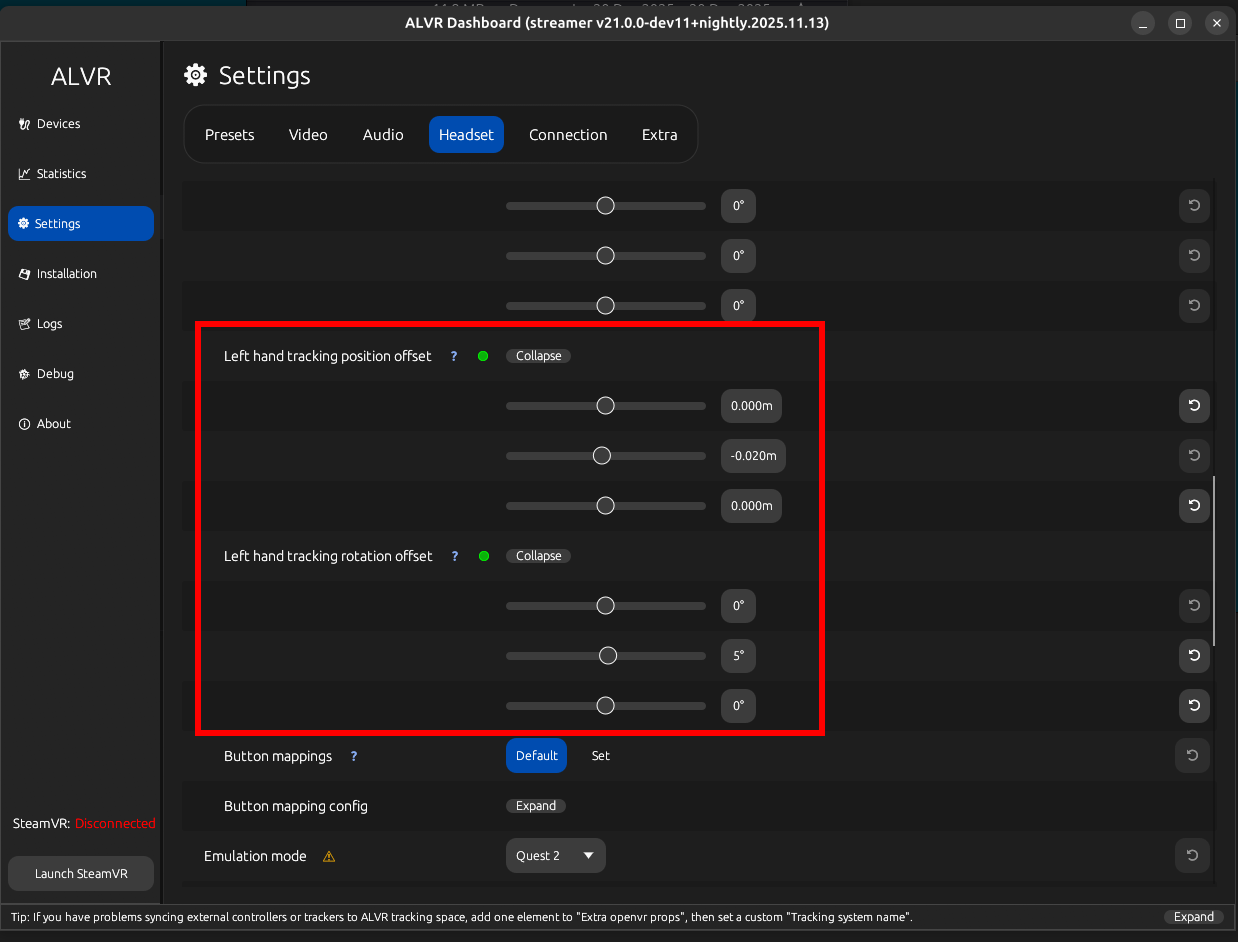
- Offsets: Set handtracking postion offsets to (0, -0.02, 0) for x, y, z and handtracking rotation offsets to (0, 5°, 0). We use this adjust the orientation of the hands for IK hand tracking. The default setup in IsaacLab has the hands rotated by about 5°, which makes it difficult for proper manipulation.
4. Configure SteamVR for OpenXR
SteamVR needs to be set as the OpenXR runtime:
# Set SteamVR as the active OpenXR runtime
~/.steam/steam/steamapps/common/SteamVR/bin/linux64/vrmonitor
# In SteamVR settings, go to Developer tab
# Set "Set SteamVR as OpenXR runtime"
Be sure to set the SteamVR launch options per ALVR’s recommendation
/<PATH-TO-STEAMVR-INSTALL>/bin/vrmonitor.sh %command%
5. Install IsaacSim and IsaacLab
Follow the official installation guides:
IsaacSim:
- Isaac Sim Installation
- Requires NVIDIA GPU and drivers
- We tested with IsaacSim 4.0+
IsaacLab:
- IsaacLab Installation
- Built on top of IsaacSim
- Provides RL training infrastructure
Make sure to checkout commit bde0bcaa1f6aacaa9b89b226d2ae10754a23d3e1
# Clone IsaacLab
git clone https://github.com/isaac-sim/IsaacLab.git
cd IsaacLab

# Checkout commit bde0bcaa1f6aacaa9b89b226d2ae10754a23d3e1
git checkout bde0bcaa1f6aacaa9b89b226d2ae10754a23d3e1

# Run installation script
./isaaclab.sh --install

# Verify installation
./isaaclab.sh -p source/standalone/workflows/teleoperation/teleop_se3_agent.py
Getting Body Tracking Working
The Challenge
Out of the box, IsaacLab doesn’t have full support for Meta Quest 3 body tracking via ALVR/SteamVR. IsaacLab needs some tweaks to properly read the body tracking data streaming from ALVR.
The Solution: OSC-Based Body Tracking
We made some changes to IsaacLab that enables body tracking support using an OSC (Open Sound Control) receiver approach. Rather than relying solely on OpenXR extensions (which can be inconsistent across platforms), this solution receives body tracking data via UDP on port 9000. We’ve made this changes available as a patch directly on top of IsaacLab.
Patch available here: IsaacLab Body Tracking Patch
Apply the patch to your IsaacLab installation (Make sure to checkout commit bde0bcaa1f6aacaa9b89b226d2ae10754a23d3e1):
cd IsaacLab

# Download and apply the patch
wget https://gist.github.com/miguelalonsojr/d0e6d25e91eed9575bd7a05543ed9125 -O full_body_teleop.patch

git apply full_body_teleop.patch

# See the gist for detailed instructions
Technical Implementation
The patch implements a comprehensive body tracking pipeline with the following components and changes:
1. OSC Body Receiver (body_osc_receiver.py)
A new module that handles body tracking data reception:
- Tracked Joints: 9 key body joints at 7 DOF each (3 position + 4 quaternion rotation)
- Head
- Hip (root)
- Chest/torso
- Feet (left/right)
- Knees (left/right)
- Elbows (left/right)
- Network Protocol: Listens on UDP port 9000 for OSC messages
- Coordinate System: Uses Z-up convention with X-forward orientation
- Rotation Computation (optional): Heuristically computes joint orientations by calculating forward vectors between connected joints. This is optional and is only triggered when needed via an API call and was implemented this way for speed.
The receiver reconstructs full 6DOF poses from position data, making it robust to varying tracking quality.
2. Device Base Extensions
We had to add BODY = 5 to the TrackingTarget enum, establishing body tracking as a distinct tracking category alongside controllers and hands.
3. OpenXR Device Integration
We modified openxr_device.py to integrate the OSC body tracking:
- Imports
BodyOscReceivermodule - Defines
BODY_TRACKER_NAMESarray with supported body trackers - Added
_calculate_body_trackers()method to retrieve pose data from OSC - Updated documentation to reflect body tracking capabilities
- Initialization of body tracking dictionaries in reset procedures
4. Retargeting for GR1T2 Humanoid
We enhanced gr1t2_retargeter.py to support body-to-robot retargeting:
- Added visualization for body joint positions and orientations using sphere markers
- Updated
retarget()method to process body pose data alongside hand data - Modified
get_requirements()to includeBODY_TRACKINGas a requirement - Real-time visual feedback showing tracked body joints in simulation
5. Teleoperation Script Improvements
We also enhanced teleop_se3_agent.py with keyboard controls:
- ‘R’ key: Reset the simulation
- ‘S’ key: Toggle teleoperation on/off
- Added
Se2Keyboardsupport for command input - Keyboard callback mappings for intuitive control
The original example in IsaacLab with the AVP controlled the simulation via the headset application. Since we’re using ALVR’s VR android app, there’s really no way to do that without building a new VR app. And although that would be nice, it’s not necessary and out of scope for this project. Feel free to contact us if interested in collaborating on that project.
Data Flow Pipeline
The complete data flow looks like this:
Quest 3 Body Tracking
  ↓
ALVR/SteamVR
  ↓
OSC Messages (UDP:9000)
  ↓
BodyOscReceiver (position extraction)
  ↓
Rotation Recomputation (forward/up vectors → quaternions) (optional)
  ↓
OpenXRDevice (pose retrieval)
  ↓
Retargeter (humanoid mapping)
  ↓
IsaacSim Robot Commands
This architecture decouples the body tracking source from the simulation, making it easy to swap in different tracking systems that stream tracking data via OSC.
Testing the Setup
Once everything is installed and patched:
- Start SteamVR with ALVR connected
- Put on your Quest 3 and ensure body tracking is active
- Launch IsaacLab teleoperation script:
./isaaclab.sh -p scripts/environments/teleoperation/teleop_se3_agent.py \
    --task Isaac-PickPlace-GR1T2-Abs-v0 \
    --teleop_device handtracking \
    --enable_pinocchio
- Use keyboard controls:
- Press ‘S’ to toggle teleoperation on/off
- Press ‘R’ to reset the simulation
You should see your body movements mirrored in the simulation environment in IsaacSim in real-time! The red sphere markers will visualize each tracked joint, giving you immediate feedback on tracking quality.
Results
Here’s a video of the body tracking system in action:
The system successfully captures:
- 9 body joints tracked at 7 DOF each (head, hip, chest, feet, knees, elbows)
- Full 6DOF poses with position and orientation
- Real-time updates matching simulation steps
- Low latency (<50ms on good WiFi)
- Visual feedback via red sphere markers showing body joint positions in real-time
- Retargeting to GR1T2 humanoid robot morphology (hands only for now)
Current Limitations
While the system works well, there are some limitations:
- Leg tracking accuracy: Quest 3 infers leg position from head/torso - not always perfect
- Occlusion handling: Arms behind back can lose tracking
- Network dependency: WiFi quality directly impacts latency
- No full body tracking/retargeting yet (only hands right now): This will be covered in future posts
Next Steps
The goal of this project is to first establish a robust way to collect full body tracking data (including hands) for teleop use cases. The end goal for us is to be able to collect locomanipulation data to build general policies for loco-manipulation for humanoids and bimanual mobile platforms. Towards that end, there are many other components that we’ll need to build:
- Physics based cross-embodiment motion controller
- A discriminator that can encode full body human pose information into a latent embedding space (we’ll use this later for encoding human teleop full body pose info for controll and to create the imitation learning dataset)
- Skill based cross-embodiment low-level motion controller
- VLE (Vision Language Embedding model) that produces embeddings to drive the low-level motion controller
- Probably lots of other stuff that we didn’t list :)
Conclusion
We’ve successfully set up a full-body tracking pipeline using the Meta Quest 3, ALVR, and IsaacSim with an OSC-based receiver architecture. This provides an affordable, flexible foundation for collecting teleoperation data for humanoid robot learning.
Key achievements:
- 9 body joints tracked at full 6DOF
- OSC-based architecture that decouples tracking source from simulation
- Real-time retargeting to the GR1T2 humanoid morphology
- Visual debugging with sphere markers for joint positions
- Keyboard controls for easy operation
The ability to capture natural human motion in simulation opens up exciting possibilities for training embodied AI policies. Combined with sim2real transfer techniques, this data can help robots learn complex manipulation and locomotion behaviors.
The OSC-based approach also makes it easy to integrate other tracking systems in the future—whether that’s higher-end motion capture.
Stay tuned, more great stuff to come!
Resources
- IsaacLab Body Tracking Patch: https://gist.github.com/miguelalonsojr/d0e6d25e91eed9575bd7a05543ed9125
- ALVR GitHub: https://github.com/alvr-org/ALVR
- IsaacSim Docs: https://docs.omniverse.nvidia.com/isaacsim/latest/
- IsaacLab Docs: https://isaac-sim.github.io/IsaacLab/
- SteamVR Linux Installation: https://linuxcapable.com/how-to-install-steam-on-ubuntu-linux/
- Meta Quest Developer Hub: https://developer.oculus.com/